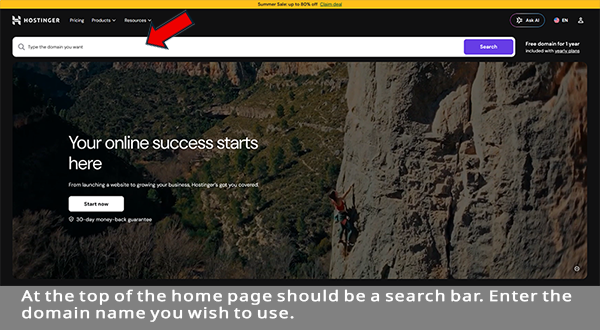
If you already registered a domain name and setup hosting then you're good for now. If you haven't, you'll need to first register a domain name then setup hosting service in order for your site to go live on the Internet. The company you use will host your site on their servers hence the name. Hosting is nothing more than renting the servers needed to to upload and host your site on the Internet. Unless you have your own web servers this step cannot be bypassed. Yes, you can actually use your computer to host but you have to know what you're doing and the amount of sites you can host depends on the size of your hard drive and whether the site is Static or Dynamic. There's one more thing to consider when it comes to hosting from your PC and that is if the PC is turned off, sleeps, or reboots, the website goes off line. There are four main types of hosting services; Shared, VPS, Dedicated and Cloud. The type needed depends on the type and size of your website. The answer depends on the hosting company. Like search engines, hackers also use crawlers to scan the Internet for vulnerable websites looking to steal login credentials, identification data, and financial information. Their intent is to monetize or access secure systems. Passwords, usernames, addresses, emails, credit card/bank account numbers, and social security numbers are just some of what hackers are after. They will try to access billing details for direct theft and names, home addresses and birth-dates & social security numbers for identity fraud. Getting a domain name is easy. The first thing you'll need to do is register the name. Log onto the hosting service of your choice. Make sure the company you use is a well known, reputable company. Entirely Digital, Hostinger, NameCheap, and Name.com are good places to start. The home page should contain a search area where you can enter the name you wish to use and it will tell you whether that name is available. Make sure to enter the entire URL name you want. For example, if the name you want is jimscookies.com enter it exactly that way making sure to include the extension (.com). If the name is not available with the .com extension it will give you other suggestions of that name with other extensions that are available like jimscookies.net, jimscookies.co, etc. Make your choice and add to cart.
You should be able to add the hosting service at this point so go ahead and add that. You're ready to check out. Registration is a yearly renewal and the hosting service is a monthly payment unless you want to pay for the year. Note the low price for a shared account.
Both domain registration & hosting services are not an expensive investment if going with shared hosting. The price for shared hosting can be as low as $3.00 per month. The disk and bandwidth usages are usaully sufficient for that price unless you have a large e-commerce site with more than 50 pages. Domain name registry must be renewed yearly and the cost is about $16.00 per year or more depending on the company you choose.
Shared hosting is like renting an apartment. Although you share the same building & utilities you have your own space and you pay for your use of the utilities. With shared hosting you share the same bandwidth, CPU & RAM but have your own directory or partition. The low price of shared hosting is the main benefit. All users share one high-powered server and they also share the total cost of the machine. Keep in mind that shared hosting can have security issues. If one website is vulnerable other sites can be effected that are on the same server. If one site gets infected or hacked with malware, it could impact other sites as well. So if your site will include customer information or data shared is not the way to go.
Shared hosting can effect SEO rankings if there are large sites using the same Bandwidth, CPU and RAM as yours and cause slow load times for your site. FCP (First Contentful Paint) can be effected. The time it takes DOM content such as text, images, or SVG's to load on your screen is measured by FCP. However, if you're just starting out with a small site that will not feature sensitive customer information or data or simply writing a blog, shared hosting is the most cost worthy route.
VPS (Virtual Private Server) gives you greater control over the environment by offering dedicated resources. While you share the physical hardware the server is split into isolated virtual compartments. VPS is typically for mid sized sites or blogs that have grown out of shared hosting. These types of servers can be fully customized to optimize for speed and reliability. VPS is more expensive than shared and technical expertise is required. However, some hosts do offer pre-configed VPS hosting and virtual servers do offer greater isolation then shared. Check with your provider to find out about pre-configed services.
Dedicated hosting is the most secure usage wise. With a dedicated server you are the only client using the machine. That means that the CPU, RAM, storage, and bandwidth is fully dedicated to your website. Dedicated servers are not as cost effective as shared or VPS but are required for government, finance, and healthcare. These industries must meet strict data protection regulations (HIPPA, PCI-DSS, GDPR). Large sites like ecommerce that will handle thousands of simultaneous user requests or have customer data or sensitive customer information will definitely need a dedicated server.
The cost of a dedicated server averages anywhere between $60.00 to $700.00 for premium per month because you have your own machine and are not sharing with any other sites so you are responsible for the whole cost. The bigger the site the more bandwidth, CPU & RAM you'll need and effects the price. For large sites that continue to grow, like ecommerce sites with thousands of products, The price increases as the site grows and uses more CPU & bandwidth. Dedicated plans are either Managed or Unmanaged. Technical expertise is needed for Unmanaged. You handle the updates and security while Managed includes full administration. Some providers require a setup fee.
Cloud hosting offers a connected network of multiple servers rather than a single machine. This type allows for major traffic flows and is for websites that will quickly grow over time. For very large sites needing reliability, redundancy and speed, cloud hosting is the way to go. The price of cloud hosting depends on traffic and the provider. Scaling, maintenance, and infrastructure are usually handled by the provider. Although it is generally secure, cloud hosting shares physical infrastructure but the fact that they are virtual keeps the environment isolated. Cloud hosting is cheaper than dedicated but the price can vary depending on traffic and the provider.
Is a dedicated server secured enough for a website that includes personal information or data? It depends on the hosting company and what they offer. We'll cover that next...
Remote code, compromised credentials, and software vulnerabilities make it easy for hackers to install malware on a server. Attackers are experts at tricking the system using malicious file uploads. Unpatched software is also easily exploited. Weak or reused passwords are also an invitation for hackers. Never use passwords like "admin" or your name. Those are easy targets. If a web page is infected with malware it can be easily removed. Locate the code using a security scanner and manually delete the malicious code. However, restoring a clean backup file is always best. If your site is using plugins and/or passwords update them immediately.
A patched CMS (Content Management System) is one way to protect against threats. Patching uses software with continuous security fixes and updates. It also protects against known cyber threats by utilizing bug corrections and code improvements. Platform apps that use such software, known as Softaculous, are Wordpress, Drupal, and Magento. Patch management is the process of identifying, testing, deploying, and verifying software updates across your IT infrastructure to eliminate security vulnerabilities, fix bugs, and maintain system stability. It stops threats by closing known security gaps before hackers can use them to break in. It also fixes bugs and stops errors that can slow or crash your website.
The problem is these systems must be updated or they are easy targets. 49% of all websites are created on Wordpress making that platform the number one choice for hackers. Developers using Wordpress must make sure the platform is continuously updated. Some hosting providers also offer CMS support. They use tools inside control panels (such as cPanel) known as one-click installers allowing for the installation of CMS on the server space that is rented by the user. Some companies that provide the infrastructure allowing for the installation of CMS are GoDaddy, InMotion, and DigitalOcean. Squarespace and Wix offer their own proprietary CMS with their subscription.
Patch is simply the security behind CMS. CMS is a system that allows users to create and edit pages without writing code. A Patched CMS is a CMS with security measures using installed software. It simply provides a back-end dashboard and database. So, to really protect a website from threats is Patched CMS enough? The answer is no. WAF (Web Application Firewall) is a tool that filters and blocks malicious traffic. Its main purpose is to block cyber attacks such as cross-site scripting, SQL injection and bots. It is a shield that sits between the web server and the internet and scrutinizes incoming traffic. Cloudflare WAF, AWS WAF and Sucuri are examples of WAF software companies.
Some hosting companies who feature Linux servers have software known as Imunify360. It integrates with control panels like cPanel and includes an advanced firewall and automated malware defense. It monitors scripts to stop what are known as Zero-day attacks. The malware scanner runs background checks and automatically cleans infected files. It also includes a WAF to block bots. Ask your hosting provider about the type of secuity measures they feature.
One more piece of advice when it comes to website security. Whether your site has security measures or not you always want to keep a copy of all the site files and pics. These should be saved off-line. If a page becomes infected with malware you can delete it from the server and upload a clean copy. Even if your developer keeps copies you should always have a copy for yourself. If your site is simply an informational site with no personal customer information or data you may not need to spend money on top secuity measures.
The bottom line is if your site will include customer information, log in or data info. an SSL Certificate and Patched CMS are not enough security. You will definately want WAF as well. Again, if you're just starting out with a small site at first and your site will not contain any customer or data information, shared hosting is the way to go. It is the most cost effective way especially if the money is not yet rolling in. Once you've decided which type of server you want it's time to go ahead and get the domain name. We'll get into that next...
One more bit about hosting. If your site will indeed contain sensitive data or customer information you will want to also add SSL (Secure Sockets Layer). SSL is an encrypted protocol that establishes an authenticated link between a browser and a server that prevents hackers from intercepting sensitive information. This can be done when you register and purchase your domain name. This also helps with SEO optimization. Websites with SSL display "HTTPS" instead of "HTTP" in the URL.
If you need help getting the domain or hosting service setup, we're here to help. Call or text us at: 484-538-8958, email us at: info@spidergraphicdesigns.com or use the contact form.
Go to Step 2 - Decide on website type.